Flux Kontext Max Image Editor
Top-tier Flux Kontext. Best prompt adherence and typography.
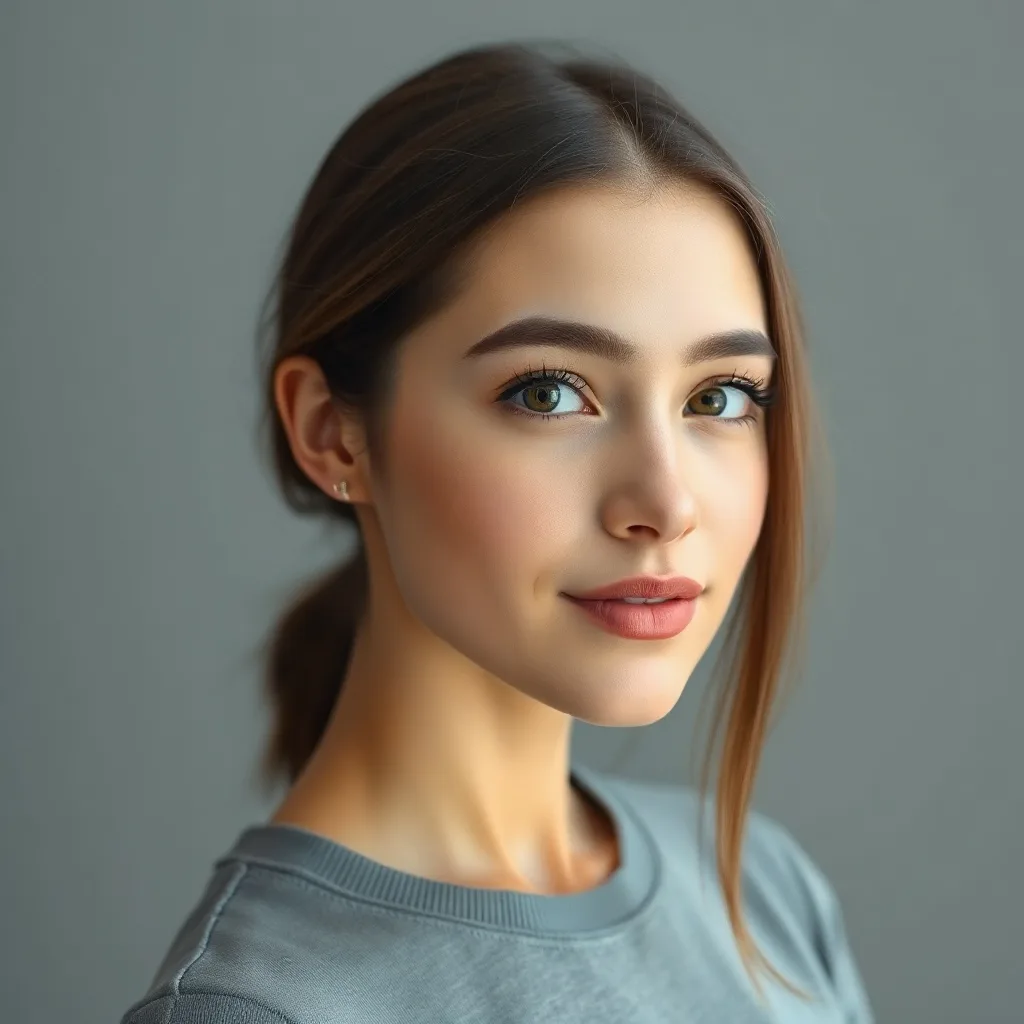
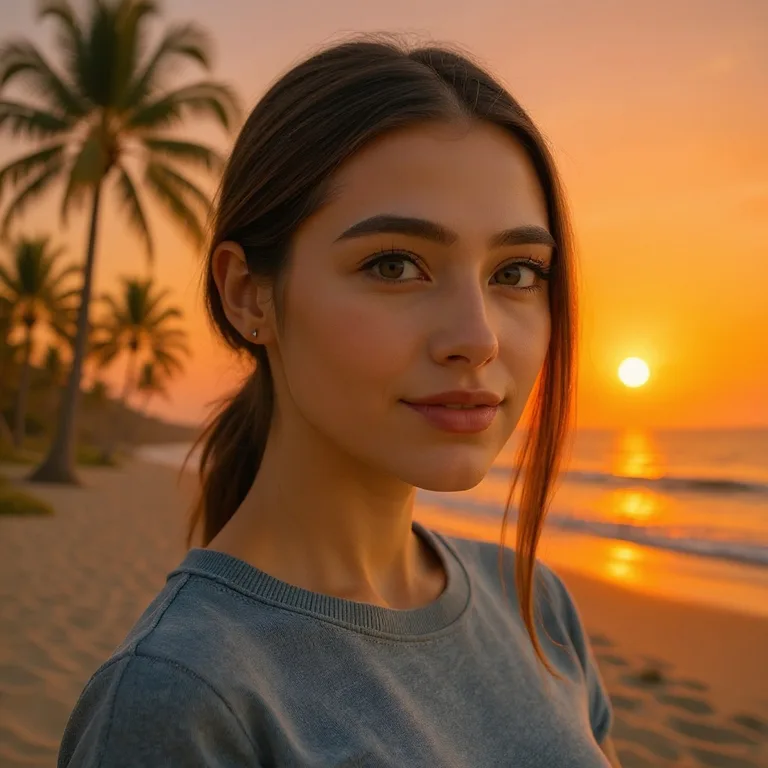
Edit: "replace the background with a vibrant sunset beach with palm trees and golden hour lighting"
About Flux Kontext Max
Flux Kontext Max is the premium tier of BFL's Kontext line, optimized for two things Pro struggles with: rendering legible text inside images and following complex multi-clause instructions without ignoring half of them. It costs more per edit than Pro, but the quality gap is most visible when your prompt has multiple constraints (e.g., "change the background AND swap the shirt color AND keep the brand text readable on the bag").
Heads up
The price jump from Pro is steep. Use Max only when text rendering or compound instructions actually matter — for simple edits, Pro is equivalent.
Best use cases for Flux Kontext Max
Where this model produces meaningfully better output than alternatives.
Edits involving readable text
Logos on products, signs, book covers, t-shirt prints. Max preserves and modifies text far better than Pro.
Multi-step compound instructions
When you need 3+ things to change at once and Pro starts dropping requests, Max follows through.
High-end product photography
E-commerce hero shots where every detail matters and you can't afford a mediocre output.
Typography-heavy designs
Magazine layouts, book covers, packaging mockups — anything where text is a first-class element.
Marketing visuals at scale
When you're generating 50 variants for A/B tests and need each to honor the exact spec.
Tips for great results with Flux Kontext Max
Practical tricks based on how this specific model was trained.
1. Explicitly mention text that should remain
Why: Max's typography rendering is its key advantage — call it out explicitly so the model prioritizes it.
2. Stack multiple constraints in one prompt
Why: Max handles compound prompts where Pro starts dropping requests. Take advantage of it.
3. Be precise about positioning
Why: Max understands spatial language better than most models. Use prepositions liberally.
Interior editing example
Same model, different task — adding a new element to an existing scene.


Edit: "add a tall floor-to-ceiling stone fireplace with a roaring warm fire to the wall behind the sofa"
How Flux Kontext Max compares
Quick comparison against the closest alternatives.
| Model | Maker | Tier | Best for |
|---|---|---|---|
| Flux Kontext Max | Black Forest Labs | Premium | Edits involving readable text |
| Flux Kontext Pro | Black Forest Labs | Recommended | Portrait edits without losing identity |
| ChatGPT Image 2 | OpenAI | Premium | High-resolution final outputs (up to 4K) |
| Flux 2 Max | Black Forest Labs | Premium | Editorial and magazine spreads |
Try Flux Kontext Max on your own image
Upload any photo, describe what to change, and Flux Kontext Max handles the rest.
Open editor →FAQ
What is Flux Kontext Max and who made it?
Flux Kontext Max was built by Black Forest Labs, released in 2025 (12B (tuned) parameters). Flux Kontext Max is the premium tier of BFL's Kontext line, optimized for two things Pro struggles with: rendering legible text inside images and following complex multi-clause instructions without ignoring half of them. It costs more per edit than Pro, but the quality gap is most visible when your prompt has multiple constraints (e.g., "change the background AND swap the shirt color AND keep the brand text readable on the bag").
How does pricing work on renza?
Pay-as-you-go credits — no subscription, no monthly minimums. Credits never expire. New accounts get free credits to try things out. Each model has its own credit cost based on what it costs us to run; check the editor for current pricing on this model.
What kind of edits does Flux Kontext Max handle well?
Logos on products, signs, book covers, t-shirt prints. Max preserves and modifies text far better than Pro. When you need 3+ things to change at once and Pro starts dropping requests, Max follows through. E-commerce hero shots where every detail matters and you can't afford a mediocre output. Limitation: The price jump from Pro is steep. Use Max only when text rendering or compound instructions actually matter — for simple edits, Pro is equivalent.
How does Flux Kontext Max compare to other editors?
Flux Kontext Max is most often compared to Flux Kontext Pro, ChatGPT Image 2, Flux 2 Max. The right pick depends on your specific use case — see "Best use cases" above for guidance, or open the editor and try them side by side on your own image.
Can I use the output commercially?
Yes. Generations made on renza are yours to use commercially. Standard FAL terms apply to the underlying models — none of the editors in this list restrict commercial use.
Is there a free trial?
Yes — new accounts get free credits at signup, enough to try a few different models. No credit card required.