Resize a photo for your LinkedIn profile picture
Drop a photo, drag the square over your face, and download it at the exact size LinkedIn wants: 400×400 minimum, 800×800 recommended. The preview shows how the crop reads inside the circle on your profile and at the 48-pixel size it gets in the feed, which is where most people first see it. Nine platform presets, nothing uploaded, no signup.
What a good crop looks like at feed size
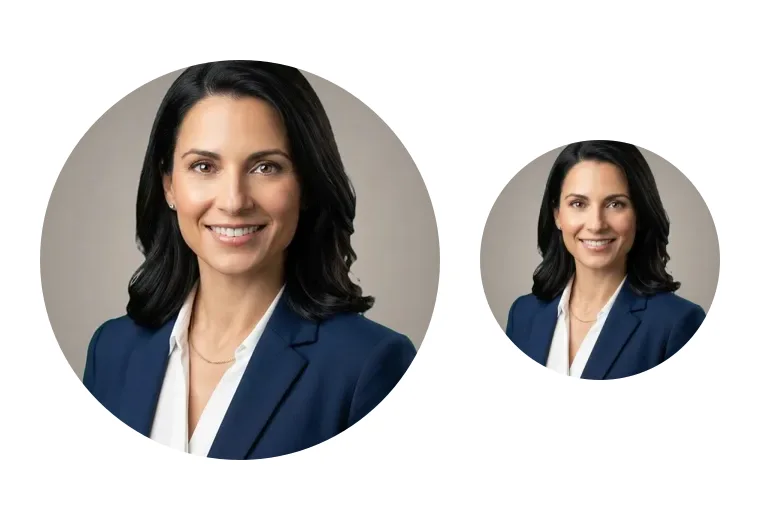
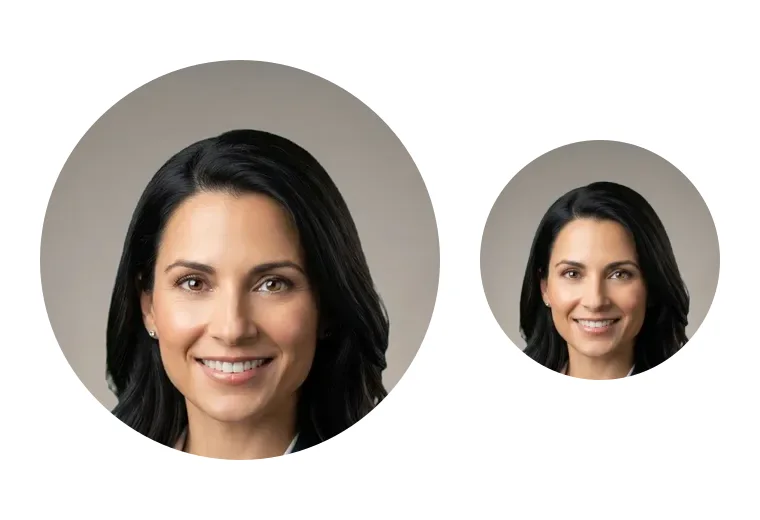
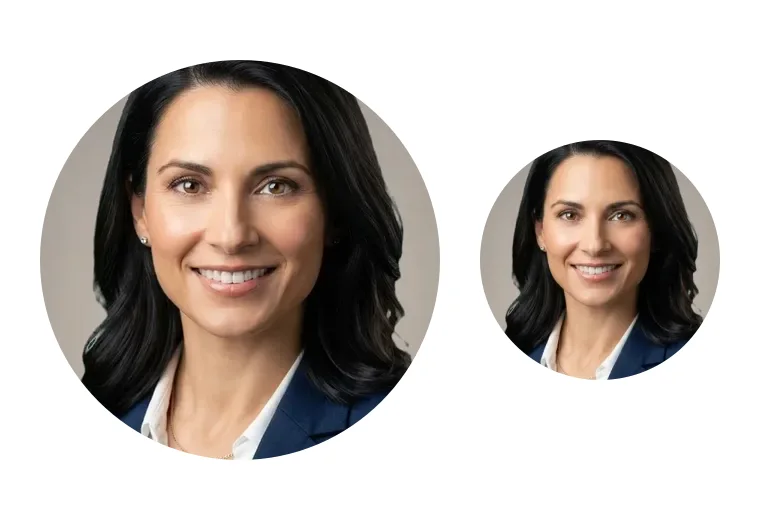
The same photo, three ways. Only the tight one survives the 48-pixel circle.
About the linkedin photo resizer
LinkedIn accepts profile photos between 400×400 and 7680×4320 pixels, up to 8MB, as JPG, PNG or GIF, and displays them as a circle. Those numbers are the easy part. What actually goes wrong is the framing.
Why most LinkedIn photos look wrong
People upload a full-body photo or a wide shot, LinkedIn shrinks it into a circle, and the face ends up the size of a coin. In the feed, where the photo is 48 pixels across, that face is unrecognizable.
The rule that fixes it: your face should fill 60 to 70 percent of the frame, with the eyes in the upper third and a little space above the hair.
How this tool applies the rule
The crop box starts square and centered on the top of the photo, where faces live. You drag it to fit, and both previews update as you move: the 200-pixel profile circle and the 48-pixel feed circle. When the 48-pixel one looks like you, you are done.
The export is a JPG at the platform's recommended size, resampled with high-quality smoothing so it stays sharp when LinkedIn compresses it.
The other platforms
Zoom and Teams also show circles. Slack shows a rounded square at 512. Google and Gmail want at least 250 square. X uses 400.
The document presets cover a 4:5 resume photo that prints at 2 by 2.5 inches, the 2.5 by 3.5 inch ERAS residency photo at 300 dpi, and the 2 by 2 inch US passport photo, which many badge systems also ask for.
Privacy
Everything runs in your browser. The photo never leaves your device, which matters more for a picture of your face than for most files.
How it works
Drop your image
Drag and drop or click to browse. The file stays in your browser, nothing is uploaded anywhere.
Adjust the settings
Pick the options you need. The preview updates instantly so you see exactly what you will get.
Download
One click and the result saves to your device. Free, no watermark, no signup.
Tips for best results
Things that meaningfully improve the output.
Fill the circle with your face
Head and shoulders, not head to waist. Your face should be about two-thirds of the width. If the 48px preview looks like a person in the distance, crop tighter.
Eyes in the upper third
The crop box has a guide line at one third from the top. Put your eyes on it. Centered eyes leave dead space above the head and cut the shoulders.
Start from the biggest photo you have
Resizing down always looks good; resizing up never does. If the crop warns you it is under 400px, use the original from the camera roll, not the one that went through WhatsApp.
Light background, dark clothes
LinkedIn puts your circle over a white page. A light gray background with a dark top gives the strongest separation. Fix the background first with the headshot background changer, then crop here.
Same photo everywhere
Recruiters cross-check LinkedIn against your email signature and Slack. Export the LinkedIn, Google and Slack sizes from the same crop in one sitting so they match.
Need more than linkedin photo resizer?
renza's AI tools remove backgrounds, erase objects, restore old photos and upscale to print quality. Free credits at signup, no credit card.
Create free account →Frequently asked questions
What is the LinkedIn profile picture size?
Minimum 400×400 pixels, maximum 7680×4320, file up to 8MB, JPG, PNG or GIF. LinkedIn recommends 400×400 and displays it as a circle. 800×800 is the sweet spot: sharp on retina screens, still a small file.
What size is a LinkedIn profile picture displayed at?
About 200 pixels on your profile page, 48 pixels next to posts in the feed, 32 pixels in comments and messages. That is why a tight crop on the face matters more than the upload size.
Does LinkedIn crop my photo into a circle?
Yes. You upload a square and LinkedIn masks it into a circle. The corners are cut off, so keep anything that matters, like your shoulders, inside the circle shown in the preview.
What is the LinkedIn background photo size?
The banner behind your profile is 1584×396 pixels, a 4:1 ratio. That is a different image from the profile picture; this tool handles the profile picture. Use the image resizer for the banner.
What size should a headshot be?
For web profiles, square, 800×800 or larger. For print, 5×7 inches at 300 dpi is the classic actor size, 2×2.5 inches for a resume, 2.5×3.5 for ERAS. The presets here cover the web and document sizes; the crop box changes ratio to match.
Is my photo uploaded?
No. The crop and resize run in your browser with the Canvas API. Nothing is sent to a server and nothing is stored.
Why does my photo look blurry after uploading to LinkedIn?
Usually because the source was small and got upscaled, or because the crop was loose and LinkedIn enlarged a tiny face. Start from a large original, crop tight, export at 800×800.